• Skip to content
  • Skip to this site's menu
  • Skip to search

Welcome to Brock University

Information for

  • Future students
  • Current students
  • International
  • Co-op
  • Professional and Continuing Studies
  • Community partners
  • Alumni and donors

Academics

  • Faculties & Departments
  • Graduate Studies and Postdocs
  • Teaching & Learning
  • Libraries
  • Calendars
  • Academic Integrity

Research

  • Research @ Brock
  • Institutes and Centres
  • Research services
  • Brock innovation
  • Transdisciplinarity at Brock
  • Funding opportunities

About

  • About Brock
  • Visitor information
  • Contact us
  • Careers @ Brock
  • A–Z directory
  • Emergency

Quick links

  • Student Email / 365
  • my.brocku.ca
  • Brightspace
  • Office of the Registrar
  • Campus Store
  • Brock Sports
  • Important Dates
  • Students’ Union (BUSU)
  • Graduate Students’ Union (GSA)
  • The Brock News
  • Events around campus
  • Faculty and Staff directory
  • Campus Safety
  • Faculty and Staff Login
  • Faculty and Staff Email
  • ITS Help Desk - Password Resets
  • Brock U Home

Close

Want to go to Brock but not sure where to start? We can help.

How to apply

  • Undergraduate students
  • Graduate students
  • Teacher education
  • Continuing education and ESL

Our programs

  • Undergraduate programs
  • Graduate programs
  • Spring / Summer courses
  • Online Learning

Our campus

  • Take a virtual tour
  • Book a campus tour
  • Living at Brock
  • Smart Start

More information

  • Admissions @ Brock
  • Important dates
  • Financial aid
  • Request information

Close
Brock University logo
Apply @ Brock
Menu

Information Technology Services

Menu
Apply
Search

In this section

  • Main
  • Information
    • Accounts, Email, and Passwords
      • Brock DB Information System (Brock Portal)
      • Brightspace
    • Audio Visual Services
      • AV Services Catalogue
      • Crestron
      • Video Conferencing/Teleconferencing
      • Video Conferencing Applications
    • Cable TV Channels
    • Computer Labs and Printing
      • Printing in Labs
      • Lab Hours
      • Lab Software
    • Technical Support
    • VPN
    • Wireless Network
  • Cyber Security
    • Tips for securely working off-campus
    • Anti-Malware/AntiVirus
    • BrockU Cyber Aware
    • Compromised
    • Encryption
    • IoT
    • IRONSCALES
    • Mobile Devices
    • Multi-Factor Authentication
    • Passwords
    • Phishing
    • Ransomware
    • Social Engineering
    • Social Media
    • You are the Target
  • Products
    • Office 365 Products
      • Calendar
      • Delve
      • Excel
      • Forms
      • OneDrive
      • OneNote
      • People
      • Planner
      • PowerApps
      • Power Automate
      • Power BI
      • PowerPoint
      • Staff Notebook
      • Stream
      • Sway
      • Teams
      • To-Do
      • Word
      • Yammer
    • Outlook
    • Qualtrics
    • SharePoint
    • Workday (Finance & HR)
  • Services
    • Communications and Collaboration
    • Enterprise Applications
    • File/Data Storage
    • Hardware and Server Support
    • Help Desk and Training
    • Lab, Classroom, and Audio-Visual Support
    • Learning and Working Remotely
    • Networking and Connectivity
    • Office 365 Services
    • Printing Resources and Services
    • Research Computing
    • Residence Technology
    • Security and Access
    • Software Support
    • Teaching and Learning
  • ITS Policies
  • FAQ
  • About ITS
    • Contact Us
    • Emergency Notification System
  • Submit a Help Desk Ticket
Brock University Information Technology Services

Account Creation: Continuing Education Student

Managing Your Brocku Account

1. Click Login > Student Login.

2. Click Create Account.

3. Fill out the required fields, then click Register.

4. Check your inbox for the automated email that was sent to you. Click the "Click here to set your password" button.

NOTE: It can take up to 30 minutes for the email to arrive. Be sure to check your junk folder if you do not see the email in your inbox.
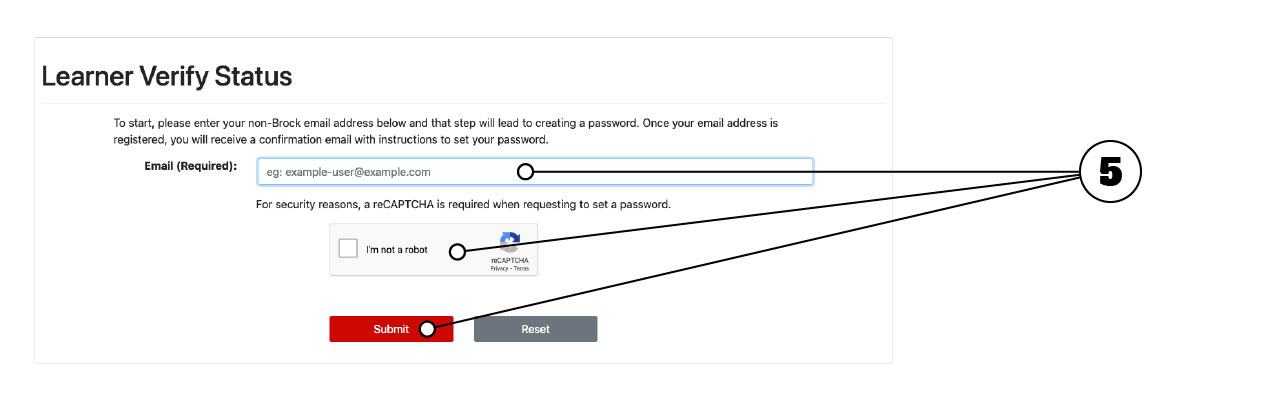
5. Enter your email, then click Submit.

6. Check your inbox for the 2nd automated email that was sent to you. Click the "Click here to set your password" button.

NOTE: Be sure to check your junk folder if you do not see the email in your inbox.

7. Read the Computer Account Agreement, check "I agree", then click Submit.

8. Enter your new password into the required fields, then click Submit.

NOTE: Your password cannot contain your username or match your first or last name.

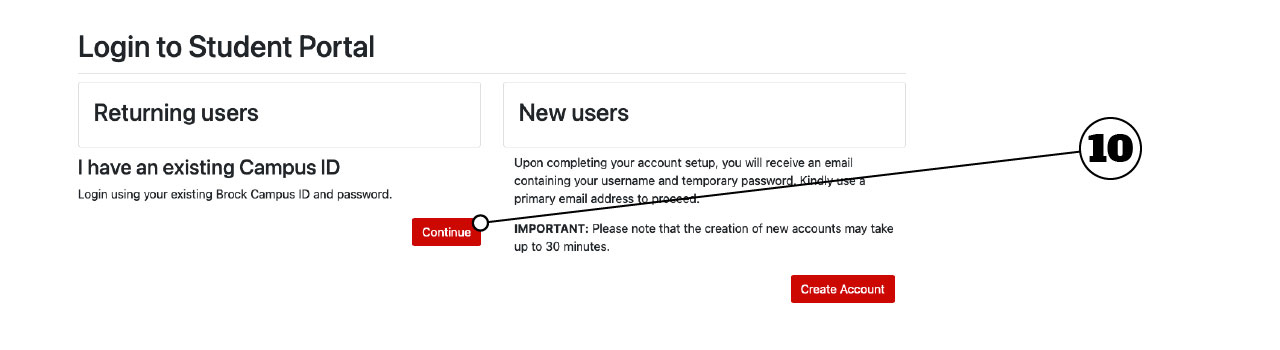
9. Your account is now set up. To login, click Login > Student Login.

10. Click Continue, then sign-in with your username and password.


Helpful links

  • Emergency contacts
  • Mental Health and Wellness
  • Campus map
  • Financial information

Connect

  • Visitor information
  • Contact Brock University
  • Media relations
  • Website feedback
Give to
Brock.

Every gift makes a difference.

Ways to give

Copyright © 2026
Brock University

Non-discrimination Policy
University policies
Privacy Accessibility

Niagara Region
1812 Sir Isaac Brock Way
St. Catharines, ON
L2S 3A1 Canada
+1 905-688-5550

  • Facebook
  • X, formerly Twitter
  • Instagram
  • LinkedIn
  • Youtube
  • Youtube
A-Z directory

We acknowledge the land on which Brock University was built is the traditional territory of the Haudenosaunee (ho-din-anish-shonee) and Anishinaabe (A-nish-shin-aaabee) people, many of whom continue to live and work here today. This territory is covered by the Upper Canada Treaties and is within the land protected by the Dish with One Spoon Wampum agreement. Today, this gathering place is home to many First Nations, Métis and Inuit, and acknowledging reminds us that our great standard of living is directly related to the resources and friendship of Indigenous people.


Top

We use cookies to improve your overall web experience. By using our website you consent to our use of cookies in accordance with our Privacy Policy