Accommodations at the university level are designed to ensure equal access to education for students experiencing functional impacts due to disability.
Accommodations are individualized and determined on a case-by-case basis considering student experience, documentation and an assessment of course requirements.
How to get your accommodation plan
Your accommodation plan ensures equal access to education, fairness and equity, individualized support, legal compliance, and promotion of inclusivity.
Accommodation information
Academic accommodations through Student Accessibility Services may include:
- Permission to audio record lectures and notetaking support.
- Sign-language interpreters or use of FM system in lectures.
- Access to textbooks in an alternative format.
- Adjustments to participation or course deliverables.
- A quiet location to write exams.
- Additional time for exams.
- Use of assistive technology during exams.
It is important to note that accommodation plans:
- Can be temporary or ongoing, depending on the supporting documentation and disability.
- Do not alter essential course or program requirements.
- Do not guarantee an academic outcome.
Returning SAS Student? Update your courses
Update your courses each term to apply your accommodation plan to all courses.
Steps to renew your accommodations
- Wait until classes have started.
- Visit the OASIS student portal.
- Click “Summary” tab.
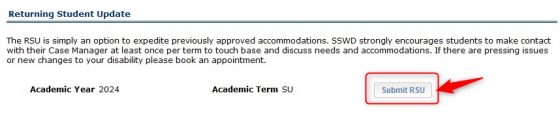
- Scroll down to the “Returning Student Update” section.
- Verify the correct “Academic Year” and “Academic Session”.
- Click “Renew Accommodations”.

- Your accommodation plan has now been renewed and applied to your new courses! View your accommodations and download your accommodation letters.
Adding new courses during a term
If you add a new course during the term, then attend your Case Manager’s drop-in hours to update your courses.
Placement coming up?
Students should connect with their Case Manager one term in advance to discuss their placement and accommodation needs.
Policies & Legislation
Student Accessibility Services is guided by policy and legislation at both the institutional and provincial levels.
Learn how these frameworks shape the way we support students.