You have received your room assignment email. Now it is time to figure out which residence building and room you are in.
Step 1 - Find your residence name
First you need to figure out the residence. Look at the first few letters of your room assignment. The following is a list of what they mean:
- DEC = DeCew Residence
- ERP = Earp Residence
- GWY = Gateway Residence
- LOW = Lowenberger Residence
- QV = Quarry View Residence
- RES8 = Residence 8
- VAL = Vallee Residence
- VIL = Village Residence
Step 2 - Find your bedroom information
After determining the residence building you are in now you can determine where your room is for move-in day. Find and select your residence building below.
This is an example only for deciphering a bedroom assignment.

The infographic explains how to understand your DeCew single bedroom code.
- The first 3 letters indicate the residence. In the example, “DEC” indicates DeCew Residence.
- The following two numbers indicate the stairwell used to access the floor. In the example, the “DEC 05” indicates the stairwell is number 5. The following combined stairwells are connected to make a house: 1/2, 2/3, 4/5, 6/7, 8/9, 10/11, 11/12, 13/14, 15/16, 17/18. In the example, the stairwell 4 and 5 make a house in DeCew Residence.
- The next number indicates the floor. In the example, “DEC 055” indicates the room is on the 5th floor.
- The letter indicates your room. In the example, the room is the “D” room.
This is an example only for deciphering a bedroom assignment.
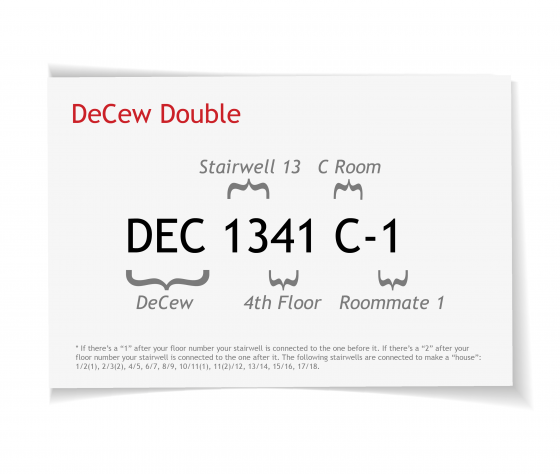
The infographic explains how to understand your DeCew double bedroom code.
- The first 3 letters indicate the residence. In the example, “DEC” indicates DeCew Residence.
- The following two numbers indicate the stairwell used to access the floor. In the example, the “DEC 13” indicates the stairwell is 13. The following combined stairwells are connected to make a house: 1/2, 2/3, 4/5, 6/7, 8/9, 10/11, 11/12, 13/14, 15/16, 17/18. In the example, the stairwell 13 and 14 make a house in DeCew Residence.
- The next number indicates the floor. In the example, “DEC 134” indicates the room is on the 4th floor.
- The following letter and number indicates the room. In the example, the “C” is the C room and the “dash 1” indicates the one of the two beds in the room. The other bed or room mate is in brackets following. In the example, the room mate is “1341 C-2” but there are no assigned beds in a double room as the students will choose their bed on move-in day.
This is an example only for deciphering a bedroom assignment.
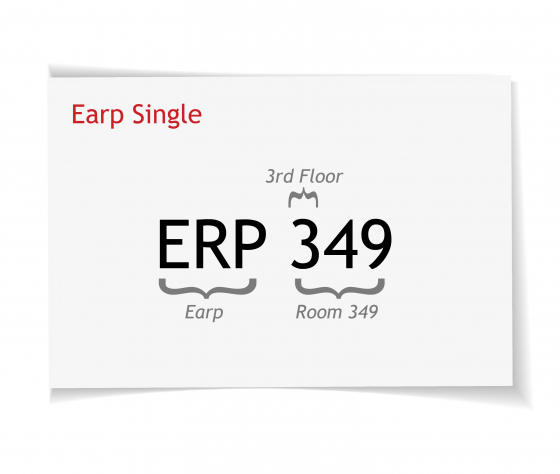
The infographic explains how to understand your Earp single bedroom code.
- The first 3 letters indicate the residence. In the example, “ERP” indicates Earp Residence.
- The first number indicates the floor. In the example, the “ERP 349” indicates the third floor and the bedroom is room 349.
This is an example only for deciphering a bedroom assignment.
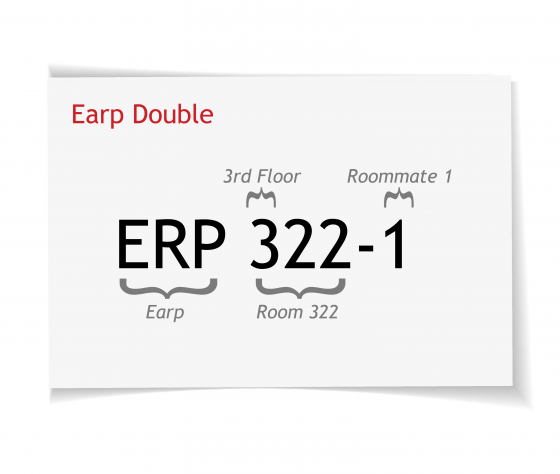
The infographic explains how to understand your Earp double bedroom code.
- The first 3 letters indicate the residence. In the example, “ERP” indicates Earp Residence.
- The first number indicates the floor. In the example, the “ERP 322” indicates the third floor and the bedroom is room 322.
- If there is a number in brackets, this indicates the adjoining room. In the example ERP 322-1 means there are two beds. There are no assigned beds in a double room as the students will choose their bed on move-in day.
This is an example only for deciphering a bedroom assignment.

The infographic explains how to understand your Gateway single bedroom code.
- The first 3 letters indicate the residence. In this example, “GWY” indicates Gateway Residence.
- The first digit indicates the floor. In the example, “GWY 103” indicates the room is on the first floor and the suite is 103.
- The following letter indicates the bedroom. In the example, the bedroom is the “B” room.
Lowenberger Residence has two bedroom types a single bedroom (1 occupant) and a double bedroom (2 occupants).
This is an example only for deciphering a bedroom assignment.

The infographic explains how to understand your Lowenberger single bedroom code.
- The first 3 letters indicate the residence. In the example, “LOW” indicates Lowenberger Residence.
- The first number indicates the floor. In the example, the “LOW 215” indicates the second floor and the bedroom is room 215.
- In Lowenberger a single bedroom often shares a washroom with a double bedroom which is a room having two occupants or another single bedroom.
This is an example only for deciphering a bedroom assignment.
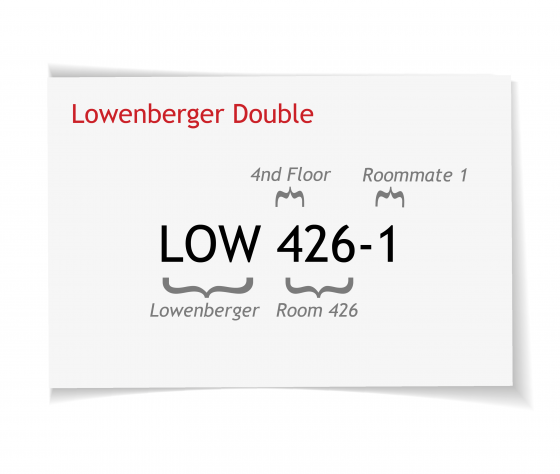
The infographic explains how to understand your Lowenberger double bedroom code.
- The first 3 letters indicate the residence. In this example, “LOW” indicates Lowenberger Residence.
- The first number indicates the floor. In the example, the “LOW 426” indicates the fourth floor and the bedroom is 426.
- The “-1” or “-2” indicates that you are in a double bedroom with another student (LOW 426-2). There are no assigned beds in a double room but the students will choose their bed on move-in day.
This is an example only for deciphering a bedroom assignment.

The infographic explains how to understand your Quarry View single bedroom code.
- The first 2 letters indicate the residence. In this example, “QV” indicates Quarry View Residence.
- The following numbers indicate the unit. In the example, the “57” indicates the unit is number 57.
- The following letter indicates the bedroom. In the example, the bedroom is the C room.
This is an example only for deciphering a bedroom assignment.

The infographic explains how to understand your Residence 8 single bedroom code.
- The first 3 letters followed by an 8 indicates the residence. In the example, “RES8” indicates Residence 8.
- The 3 numbers that follow the dash indicates the floor and bedroom number. In the example, “425” indicates the fourth floor and bedroom 425.
- Most rooms in Residence 8 have a shared washroom between two single rooms.
This is an example only for deciphering a bedroom assignment.

The infographic explains how to understand your Vallee single bedroom code.
- The first 3 letters indicate the residence. In the example, “VAL” indicates Vallee Residence.
- The first number indicates the floor. In the example, the “VAL 345” indicates the third floor and the bedroom is room 345.
- If there is a number in brackets, this indicates the adjoining room. Most Vallee bedrooms shares the washroom between the two bedrooms.
This is an example only for deciphering a bedroom assignment.
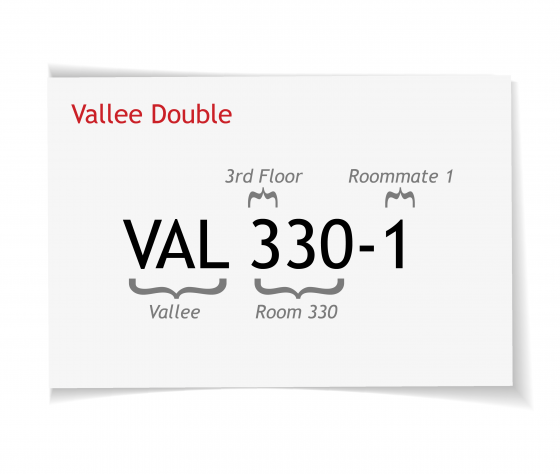
The infographic explains how to understand your Vallee double bedroom code.
- The first 3 letters indicate the residence. In the example, “VAL” indicates Vallee Residence.
- The first number indicates the floor. In the example, the “VAL 330” indicates the third floor and the bedroom is room 330.
- The “-1” or “-2” indicates this is a double bedroom meaning there are two beds. This room shares the washroom between the single and double bedrooms. There are no assigned beds in a double room as the students will choose their bed on move-in day.
This is an example only for deciphering a bedroom assignment.

The infographic explains how to understand your Village single bedroom code.
- The first 3 letters indicate the residence. In this instance, “VIL” indicates Village Residence.
- The first 3 or 4 numbers indicate the court and the unit. If the code has 3 numbers, only the first number is used to identify the court. In the example, “VIL 611” indicates court 6 unit 11. If the code has 4 numbers, the first 2 numbers are used to identify the court. As an example, “VIL 1001” indicates court 10 unit 01.
- The following letter indicates the bedroom. In the example, the bedroom is the “C” room.
This is an example only for deciphering a bedroom assignment.

The infographic explains how to understand your Village double bedroom code.
- The first 3 letters indicate the residence. In this instance, “VIL” indicates Village Residence.
- The first 3 or 4 numbers indicate the court and unit. In the example, the “VIL 1107” indicates court 11 and unit 07. But if the number is “VIL107” this indicates court 1 and unit 07.
- The following letter indicates the bedroom. Bedrooms A, B and C are single bedrooms. In the example, the bedroom is the “D” room which is a double bedroom (two beds in one bedroom). There are no assigned beds so the student will choose their bed based on availability in the D bedroom when they move in.


