CPI’s Guidance on GenAI is designed to support Brock instructors and staff in navigating the changes brought on by Generative Artificial Intelligence. Tools such as ChatGPT, Claude, Gemini, Anara, Perplexity, and Copilot are now ubiquitous; this page explores their pedagogical implications.
This site provides principled, evidence-based guidance for both responsible and effective use of GenAI in education, and aspires to do so without compromise to equity, accessibility, and privacy. Beyond overarching commentary on trends and concerns, it also aims to equip the Brock community with tools that are discipline-aware and practice-ready.
Why does GenAI matter? As educators, we must strive to help students navigate GenAI use responsibly, foster digital literacy, and support ethical research and learning practices. By engaging with GenAI thoughtfully, we can work towards an environment that prepares students to evaluate and apply emerging technologies in academic and professional contexts. The path forward is not set and will be shaped by the choices educators and students make now.
Events and Workshops
This site’s contents have been prepared by CPI staff and are informed by the 2023-2028 Academic Plan and the Ethical Framework for Educational Technologies, and align with the institutional values espoused in the Academic Integrity Policy, the Undergraduate Student Calendar, the Graduate Student Calendar, and the Faculty Handbook.
Last updated July 17, 2026.
Guidance for instructors
Use of GenAI in a course is at the instructor’s discretion. Incorporate it only when and where it aligns with course outcomes and disciplinary norms, and, as with any pedagogical approach or educational tool, take care to weigh benefits against risks. Instructors should be mindful of the GenAI industry’s rapid advancement and tool providers continually changing terms of use, and thus must anticipate regular revision.
Regardless of whether it is embraced, approached with caution, or banned, GenAI will likely play a role in your course (and we know that discursive preventative measures are largely ineffective, and that detection is both ineffective and inequitable (see the AI Detection section in our References below). A pragmatic approach to teaching will at the very least involve a conversation with your students and some shared understanding.
While that may eventually involve a welcoming of the tools into practice, steps must regardless be taken to keep grades based on students’ own work. Establishing guidelines on informed GenAI use and factual verification, promoting academic values and exploring bias, and setting safeguards for proper disclosure are critical regardless of your approach.
Artificial intelligence is a set of computer systems that perform tasks associated with human reasoning, perception, and problem solving.
GenAI is a subset that can output content in a human-like and conversational tone, and can produce text, images, code, music, and video. These models leverage enormous amounts of training data to derive patterns and statistical relationships to craft responses based on the statistical likelihood of meeting a prompt’s request. Thus, they appear to produce new or unique material.
UBC’s Centre for Teaching, Learning and Technology maintains an expansive Glossary of GenAI Terms.
- Explore the tools: Test potential use of GenAI in your course and alongside your assignments. Work to understand its capabilities and limits, and consider adjustments to approximate expected time on task and evaluation.
- Choose privacy-aligned tools: Use Brock’s institutionally-licensed option, Microsoft’s Copilot, which has data protection and clear privacy settings, or other approved tools.
- Rethink outcomes and assessments: Align tasks with the learning you intend to capture, especially in context with GenAI. Pair open practice with assessment that assures learning, perhaps by considering assessments designed to mitigate GenAI use.
- Clarify expectations: Discuss allowable use with your students. Add clear language to your syllabus and with each assignment.
- Align with your TAs: Set expectations for student use and for any available student support.
- Prepare a conversation: Plan a brief, discipline-aware talk on responsible use in your course with students. If use is to be allowed, ensure that the human-in-the-loop is prioritized.
- Model and reflect: Consider discussing a sample GenAI output for an assignment and how it did or did not meet your requirements. If use is allowed, ask students to reflect on what GenAI changed in their coursework.
- Mid-term check-in: Consider revisiting your GenAI policy with the class. Note any lessons learned and discuss how it has impacted coursework.
What belongs in the syllabus?
- A clear GenAI policy. CPI provides Course Outline Templates that you can modify and add to your syllabus.
- A brief rationale that links said policy to your Course Learning Outcomes. Explain where GenAI can help learning in your course and field and where it does not, and, if required, what verification and disclosure steps are needed.
- Consequences for misuse as aligned with Academic Integrity Policy.
- Instructions on how to cite GenAI content (if GenAI output should be attributed), and perhaps a short GenAI use disclosure template.
- Directions to privacy-aligned tools, e.g., Copilot in protected mode.
- A statement that students may opt out of any GenAI activity and that alternatives are available.
- The Brock University Library offers a self-paced tutorial for students in Brightspace. Lib 102: Me, Myself and A.I.
Students (and your teaching assistants) will arrive with different levels of familiarity and will look to you for guidance on what is permitted and why.
Assessment rationale
GenAI policies vary by course, so students will benefit from clear, repeated guidance.
- Communicate its value. Tell students how each assessment will help them learn or demonstrate their learning to you, and connect that to course outcomes.
- Discuss assignments in class and review instructions. Be explicit about the extent of allowed GenAI use and why you encourage or discourage it for the related task.
- If GenAI is part of a task, show how to use it appropriately and why it will help.
- Consider an integrity and/or reflection prompt. Add a space for students to note how they used resources, including GenAI when permitted.
- Share a pre-submission checklist that shows students what to submit and why. This could describe the criteria (what’s required), any skills or knowledge gained through completion, and the process involved (potentially including how GenAI tools were used to support learning).
Make your course policy explicit and keep it consistent across the term.
- Not permitted. AI assistance is not allowed for this course or for specified assessments. Explain why it conflicts with learning goals.
- Limited with disclosure. Define allowable uses. Outline required verification steps. Provide a short disclosure template.
- Permitted with disclosure. Allow broad use with transparent reporting of tools, prompts, edits, and checks. State quality standards.
Further details and full text examples are provided in the suggested syllabus language for GenAI section of our Course Outline Template page. Such language might be included in the Academic Integrity section of a course outline. Instructors may copy relevant sections but should be sure to replace all square-bracketed text with your course specific information.
Special thanks to Dr. Linda Carreiro, Dr. Pauli Gardner, and Dr. Tanya Martini for their contributions to the syllabus templates.
Accessibility
GenAI may support some learners in terms of assistive technology but may also create accessibility barriers for those using those same assistive technologies or with disability support needs. Ethical use requires transparent and reflective design that respects learners with disabilities as supported by the Ontario Human Rights Code.
OCAD’s Inclusive Design Research Centre created a comprehensive Framework for Accessible and Equitable Artificial Intelligence (AI) in Education.
Equitable access
Many GenAI tools offer free access tiers although these most certainly have limited features, which can create inequities if paid access confers an advantage. If you assign tool use, design activities so students who can only access certain versions are not disadvantaged and provide a no-cost path where needed. Also consider uneven off-campus internet access, data limits, and that some GenAI tools are unavailable in certain countries.
All Brock students, instructors, and staff have free and full access to Microsoft’s Copilot with an active Brock account. Other approved tools could also be considered.
If you plan to use or encourage the use of GenAI tools in your course, inform students what data the tool collects and where it is stored (or ask that they investigate, e.g., OpenAI’s Terms of use), and offer a privacy-respecting alternative for those who do not wish to share identifying information. When use is optional, allow students to opt-out without penalty, and design activities so students who decline are not disadvantaged relative to those who opt-in.
Students may wish to avoid GenAI use entirely due to concerns around privacy and data exposure, ethics, the environment, bias and harm, accessibility, tool complexity, or even potential skill erosion. If student use is required, plan for alternatives.
While there is no guaranteed method to prevent students from using GenAI tools, you can use the following strategies to clarify why their use may not be appropriate for your course or for a specific assignment or assessment:
- Talk to students about GenAI and its limitations. This will let them know that you are aware of the technology and can generate interesting discussion and help to set guidelines.
- Let students know clearly, both verbally and in assignment instructions, what tools may or may not be used to complete assignments.
- Advise students of the limitations of the technology, and its propensity to generate erroneous content.
- Students may be tempted to use GenAI even for assignments where you have specifically precluded its use. Brock University has information on how instructors can support student integrity, including designing submission methods and timelines to reduce this temptation.
If you decide to limit or prohibit the use of GenAI tools in your assignments, you can explore strategies on our page Designing Assessments to Mitigate the Use of AI Writing Tools. We also welcome you to book an appointment with our team to discuss your goals and concerns in more detail.
Yes. GenAI tools can support instructors in developing and updating course materials, for example by generating quiz questions, rubrics, or alternative explanations that can then be reviewed and revised. Instructors may also wish to use the technology to demonstrate how it can be used productively, or determine current limitations.
If GenAI tools make a substantive contribution to course material, consider some form of usage disclosure and acknowledgement, in the same way you would credit materials borrowed or adapted from a colleague. Doing so models the kind of transparent, responsible GenAI use expected of students.
Copyright and intellectual property considerations remain unsettled for content produced with GenAI in Canada, so instructors who choose to use these tools should:
- Recognize that they can create content with GenAI, but may not straightforwardly own or hold copyright over all aspects of the resulting outputs.
Avoid entering confidential information or materials they do not have rights to use (e.g., unpublished research, student work, or exam questions) without permission. - Exercise additional care even with institutionally sanctioned or protected tools (e.g., Copilot at Brock), and seek permission from the owner of any third-party or student materials before uploading or adapting them.
- Review each tool’s terms of service (e.g., OpenAI’s Terms of use), which govern how inputs and outputs can be used and shared. For tools that are not institutionally licensed, these terms can be changed unilaterally by the provider, sometimes without prior notice, and so should be avoided if relied upon for critical course functions.
- Content entered into an unvetted tool may be stored and processed outside Canada, or reused as part of the service (i.e., as training data).
Academic Integrity
Academic Integrity remains a core principle for coursework at Brock, and CPI does not necessarily encourage student use of GenAI to complete assessment. The concepts and theories on this page reflect current trends in education and technology and have been shared to support informed and ethical teaching practice.
Unauthorized use of GenAI and its outputs is a major concern for all members of the Brock community. Instructors, in particular, face new challenges around fairness, grading, and the monitoring of student learning.
Educators must consider how to promote academic honesty in an environment where GenAI is widely accessible, regardless of whether it is formally integrated into coursework.
The Brock University Academic Integrity Policy has identified the following behaviors as inappropriate. Violations may lead to disciplinary procedures under this Policy.
Examinations and Tests
- Use of unauthorized material, resources, or auxiliary tools, including artificial intelligence or providers from commercial or non-commercial sources.
Essays, Assignments, Major Research Papers, Theses
- Submission of an essay, thesis, or major research paper written in whole or in part by someone else as though it is one’s own or using output from unauthorized tools or sources (including AI) especially when plagiarism is identified through similarity reports.
- Submitting, in whole or in part, a computer program or code completed by someone else, with or without modifications, as though it is one’s own, including unauthorized AI resources.
Instructors should be aware that student-created coursework is considered the intellectual property of the student, per Section III C.4 of the Faculty Handbook. Consequently, instructors should not upload or submit student work to third-party platforms, including AI detection tools. More information is provided below.
If an instructor cannot accept academic work to the standards of originality expected, namely when the use of unauthorized AI-generated content is suspected, they are required to follow the provision outlined in the Academic Integrity Policy under Appendix 3 (“Instructors are responsible for taking steps to detect plagiarism in all course work that is submitted by Students”).
Contact CPI at [email protected] for support in academic integrity processes.
CPI strongly cautions instructors against the use of tools that purport to detect the use of GenAI in student coursework, for three primary reasons:
- These tools are neither accurate nor reliable, will only ever lag behind commercial tools, produce both false negatives and false positives (even OpenAI discontinued its own detector), and disproportionately disadvantage non-native English writers. For more information on these issues, consider MIT Sloan School of Management Teaching & Learning’s overview.
- Per Section 3 C.4 of the Faculty Handbook (Ownership of Student-Created Intellectual Property), the ownership of student-created works rests with the creator of the work. This means that student coursework is considered the student’s intellectual property and so may not be uploaded or transferred to any third-party platforms.
- Per Section 3 A.10.4.3 of the Faculty Handbook (Artificial Intelligence (AI) Detection) “Instructors are advised that submitting or sharing student work with any AI detection services is not institutionally condoned.” and section 3 A.10.4.1 of the Faculty Handbook (Software) “If an instructor has decided to employ software for assessment that students will not have direct access to, and that was not authored by a member of the University, students must be informed in writing at the beginning of the course. All software should meet the University’s privacy, accessibility and security policies and standards.” No such software currently meets these policies and standards.
Instructors have the freedom to incorporate GenAI into their teaching, however, thereby classifying it as “authorized use” under University policy.
Given that Brock University has not procured and does not internally support AI detection software, instructors should not submit student coursework to any AI detection tools or services. […] This also means that reports or other information generated through AI detection tools cannot be used as evidence in assessing students’ work.
-Memorandum from the Office of the Provost and Vice-President, Academic (Tuesday, January 28, 2025).
Instructors can promote academic integrity through ethical, well-designed teaching, learning, and assessment strategies. In the context of GenAI, consider the following steps to promote a culture of academic honesty.
- State your expectations in the syllabus and in each assignment, defining what GenAI use is authorized and what is not. Sample language is provided in CPI’s syllabus templates page.
- Design assignments that highlight process, critical thinking, reflection, and course-specific content so that demonstrated learning carries the grade. See our resource on designing AI-resistant assignments.
- Reinforce the value of original thought at every stage. Emphasize that students’ voice, creativity, and critical judgment matter in any writing, coding, multimedia work, etc., and underscore the Learning Outcomes that your assessments are designed to showcase.
- Ask students to reflect on their workflow by explaining if and how they used GenAI, or, if none was used, by describing their research, analysis, and creative choices.
- When GenAI is permitted, model how to acknowledge it. Demonstrate methods of disclosure and evidence tracking, necessary and proper citation, and direct students to relevant Library guides on citing GenAI, use rights, and copyright.
Consider: Is your role to detect learning or to detect cheating?
Assessment
Per the Vice-Provost, Teaching & Learning’s August 25, 2025 Guidance to Instructors concerning Agentic AI and Summative Assessment, departments and faculties are invited to engage in conversations concerning the future of assessment at Brock University. This may include, for example, a shift towards a program-level approach to assessment that effectively assures learning, as has recently been adopted by the University of Melbourne. Proposals will be taken to the Senate Teaching and Learning Policy Committee and the Graduate Studies Committee for consultation and consideration. Contact [email protected] if interested.
As with any assessment design revision, it’s important that those made because of GenAI tools stay aligned with your learning objectives: what is the activity measuring, what are students learning while they are completing it, and how does it fit with the learning outcomes for the course? Visit CPIs page on Designing Assessments to Mitigate the Use of AI Writing Tools for more information.
Reconsider the weighting of assessment carried out in Brightspace (e.g., online exams or quizzes, discussion forum posts, etc.) in favour of summative assessments that carry a higher degree of security, as is the case with invigilated exams or tests, interactive oral assessments, or different types of experiential learning.
As GenAI continues to reshape how students access, produce, and interact with knowledge, it is important to revisit your Course Learning Outcomes. Are they still aligned with the skills, literacies, and ethical capacities we want students to develop?
We invite you to reflect on how GenAI might impact critical thinking, academic integrity, collaboration, and disciplinary practice. To support this process, here is a helpful guide for crafting and refining Course Learning Outcomes.
CPI discourages the use of any AI analysis of student work. Students’ submitted work is considered the student’s intellectual property (IP) per Faculty Handbook Section 3.C.4.1 and should be treated with care. Furthermore, transmission of student work collected by the University to a third party can only be done after appropriate privacy and security reviews.
Transmitting student work to GenAI tools for the purpose of analysis falls within the scope of the Faculty Handbook Section 3 articles A.10.1.1, A.10.4 Software used to assess student work, and 3:B.10.3 Phrase Matching Software. These sections mandate that if an instructor has decided to employ such systems, students must be informed in writing at the beginning of the course.
The AI Assessment Scale (AIAS) is a flexible framework designed to guide the ethical and pedagogical integration of GenAI tools into educational assessments. It empowers educators to select appropriate levels of AI usage based on learning outcomes, promoting transparency, academic integrity, and student engagement. The scale ranges from no AI involvement to full collaboration, encouraging thoughtful redesign of assessments to reflect contemporary technological realities.

Description of the Scale
1. No AI
The assessment is completed entirely without AI assistance in a controlled environment, ensuring that students rely solely on their existing knowledge, understanding, and skills Example: You must not use AI at any point during the assessment. You must demonstrate your core skills and knowledge.
2. AI Planning
AI may be used for pre-task activities such as brainstorming, outlining and initial research. This level focuses on the effective use of AI for planning, synthesis, and ideation, but assessments should emphasize the ability to develop and refine these ideas independently. Example: You may use AI for planning, idea development, and research. Your final submission should show how you have developed and refined these ideas.
3. AI Collaboration
AI may be used to help complete the task, including idea generation, drafting, feedback, and refinement. Students should critically evaluate and modify the AI suggested outputs, demonstrating their understanding. Example: You may use AI to assist with specific tasks such as drafting text, refining and evaluating your work. You must critically evaluate and modify any AI-generated content you use.
4. Full AI
AI may be used to complete any elements of the task, with students directing AI to achieve the assessment goals. Assessments at this level may also require engagement with AI to achieve goals and solve problems. Example: You may use AI extensively throughout your work either as you wish, or as specifically directed in your assessment. Focus on directing AI to achieve your goals while demonstrating your critical thinking.
5. AI Exploration
AI is used creatively to enhance problem-solving, generate novel insights, or develop innovative solutions to solve problems. Students and educators co-design assessments to explore unique AI applications within the field of study. Example: You should use AI creatively to solve the task, potentially co-designing new approaches with your instructor.
Bloom’s Taxonomy Revisited provides a structured approach to designing authentic assessments that encourage higher-order thinking, making them more resistant to AI-generated responses. By focusing on skills like analysis, evaluation, and creation, faculty can craft assessments that require personal reflection, application of concepts to real-world scenarios, and original synthesis of ideas. This approach can allow students to engage with course material, demonstrating critical thinking and problem-solving beyond what GenAI can create.

Fig. 1. Bloom’s Taxonomy. Image taken from the e-campus at Oregon State University
This document presents 20 draft principles designed to guide the design and support of learning assessments at Brock University during a time of rapid technological transformation. The framework addresses key themes such as instructor agency, the intellectual friction of learning, workplace readiness, and the accessibility of assessment practices, while preserving academic freedom and integrity.
Draft principles for assessment in the era of artificial intelligence
Your feedback is welcome to the CPI directly, or during ongoing consultation opportunities.
Tools, LLMs, Chatbots, and Copilot
There are many concerns about the impact that GenAI will have on learning, including the potential for grade inflation and harms to learning as a whole, as well as the risk of diminishing students’ critical thinking skills. Indeed, there are even more about its broader impact on society and our planet itself.
Those students and instructors who understand and can use GenAI will be best equipped to judge when and where it supports learning, and, critically, when its use would forfeit learning for mere production.
CPI is available to help you explore implementation approaches, rethink course design, and navigate emergent challenges in your instructional context. For one-on-one support, email us at [email protected] with questions, concerns, or ideas related to teaching and assessment strategies involving GenAI.
A chatbot is a computer program that simulates human conversation with an end user. Not all chatbots are equipped with artificial intelligence (AI), but modern chatbots increasingly use conversational AI techniques such as natural language processing (NLP) to understand user questions and automate responses to them (IBM, 2025).
Instructors, students, and staff members at Brock University have access to Microsoft Copilot for free.
This is currently Microsoft 365 Copilot Chat (the education version with enterprise data protection, which has been reviewed by Brock University’s Legal, Compliance, and Privacy office [SharePoint]). Copilot operates within Microsoft 365’s service boundaries and respects both tenant and user permissions and thus can only access data to which the signed-in user is authorized.
If accessing directly through https://m365.cloud.microsoft/, be sure that you are logged in with your Brock account and have the green enterprise data protection shield enabled in the top-right.
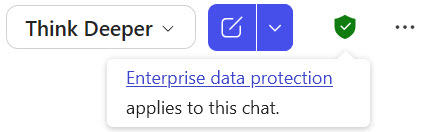
As an instructor, student, or staff at Brock University, you have access to Microsoft Copilot for free.
Try it out
Microsoft provides instructions to help get started with Microsoft 365 Copilot.
Test Copilot in your course context and to perform typical student tasks: can it respond to your assignment prompts, generate outlines, or improve readability and grammar while explaining its edits? Note where it struggles (e.g., with citations, discipline-specific accuracy, or longer documents) and use those limits to inform your guidance for students.
Version clarification
Copilot Chat (Basic) is the standard chat-based experience Brock users will see in Microsoft 365. It lets you ask questions and generate content in a chat thread.

The Microsoft 365 Copilot web app is the main access point for Copilot Chat, although it is available as a mobile app and inside many Office applications. For example, you can open the Copilot side panel in Word to help rewrite or summarize text or use the Copilot button in Outlook to assist with inbox and calendar management.
This is a lower tier than the premium enterprise version (e.g., M365 Copilot (Premium)), which is designed for deeper integration with all Microsoft 365 content and can use Microsoft Graph to automatically access other files within the user’s Microsoft ecosystem. Standard Brock users do not have access to this service.
Copilot is a conversational generative AI or chatbot that is made by Microsoft and runs on OpenAI’s large language models. It is largely passive and works with human input to generate content. ChatGPT and Gemini are other such tools.
What can Copilot do?
Copilot offers a wide range of AI-assisted capabilities to optimize workflows and enhance productivity. You can use a copilot to help with and simplify tasks like:
- Document creation: Microsoft 365 Copilot helps you draft reports, presentations, and emails by generating content and offering editing suggestions so the final result has your personal touch and suits your own style and needs. Learn more about creating documents with Microsoft 365 Copilot.
- Data analysis: In Excel, Microsoft 365 Copilot can help you analyze data trends, generate formulas, and create visualizations to simplify decision-making. Learn how to identify insights with Microsoft 365 Copilot in Excel.
- Project management: With Microsoft 365 Copilot in Microsoft Teams, it’s easier to track tasks and schedules to keep projects on course. Microsoft 365 Copilot in Teams also helps record meetings, take notes, and create action items based on conversations in your Teams calls. Learn more about working with Microsoft 365 Copilot in Teams.
- Communication: In Outlook, Microsoft 365 Copilot can help summarize key action items from your inbox by topic or sender. Microsoft 365 Copilot can also summarize lengthy email conversations, draft emails with your desired tone and length, and help adjust the tone and structure of your emails for the clearest message possible. Learn more about Microsoft 365 Copilot in Outlook.
GenAI tools are rapidly evolving, spanning conversational assistants, image generators, integrated productivity aids, and writing support embedded in common platforms. Closed systems include ChatGPT, Claude, Gemini, and Grok, while open families include DeepSeek, Kimi, Qwen or Z, and Mistral. Platforms and their strengths and weaknesses change continuously.
Selecting one of ChatGPT, Claude, or Gemini is a safe default and all support chat with files and images and can output slides, spreadsheets, visuals, and code. Free plans can handle quick asks and light drafting, while paid plans unlock higher limits, stronger reasoning or agent modes, better document handling, and more reliable performance.
Most tools let you limit whether your chats are used to train models, but the controls are not uniform. Before you upload anything sensitive, review how the tool handles your data by default and what you can change. Use institution-licensed or protected modes when available, and keep course or student data out of personal accounts.
Some AI-powered research tools, such as Anara, Gemini Notebook, and Perplexity, seek to go beyond general chatbots and are able to work from within a closed set of sources or search across live sources, categorize results, highlight citations, and help refine research questions to assist in academic work.
How is GenAI being used today?
Use is broad and rising across disciplines. Most everyday interaction with GenAI falls into three buckets: practical guidance, information seeking, and writing, and the latter is most prevalent in academic and workplace environments.
Privacy matters. Consider using tools that align with Brock’s data protection requirements. Avoid uploading sensitive materials without safeguards.
As GenAI tools become more common in education and daily life, it is essential to understand their limitations, most especially around reliability. One major concern is AI Hallucination, which occurs when a large language model (LLM), such as a chatbot, produces outputs that are inaccurate, illogical, or entirely fabricated. These responses may appear confident and well-structured but are not grounded in training data or logical reasoning. IBM compares this to how humans might see faces in clouds, except with GenAI, such misinterpretations can have serious consequences.
It is important to remember that GenAI outputs are stochastic, which means that similar prompts can yield different answers. Even advanced modes like research or agent settings reduce, but do not eliminate, error. As educators, staff, and students, we encourage everyone to read AI-generated content critically, verify claims, and invite critique and counterarguments rather than flattery or passive acceptance.
Selected resources
General
Clarke Gray, B. (2023, January 9). Whither comes the data: Current uses of AI and data set training in higher ed. TRU Digital Detox. https://digitaldetox.trubox.ca/whither-comes-the-data-current-uses-of-ai-and-data-set-training-in-higher-ed/
Gerlich, M. (2025). AI tools in society: impacts on cognitive offloading and the future of critical thinking. Societies, 15(1), 6. https://doi.org/10.3390/soc15010006
Hosseini, M., Gordijn, B., Kaebnick, G. E., & Holmes, K. (2025). Disclosing generative AI use for writing assistance should be voluntary. Research Ethics, 21(4), 728-735. https://doi.org/10.1177/17470161251345499
Hou, Y. (2025). What’s the rush? Temporality, anxiety, and the pursuit of immediacy with generative AI. Teaching in Higher Education, 1–11. https://doi.org/10.1080/13562517.2025.2571914
IBM. (2025). AI hallucinations. IBM Think. https://www.ibm.com/think/topics/ai-hallucinations
Janse, I. (2025, July 25). AI & resistance: Why saying ‘no’ is sometimes the boldest move. Centre for BOLD Cities. https://www.centre-for-bold-cities.nl/news/ai-resistance-why-saying-no-is-sometimes-the-boldest-move
Jenks, A., Onufer, L., & Guberman, D. (2024). Emergent questions of access: Disability and the integration of generative AI in teaching and learning. Higher Education Research & Development, 44(4), 932–945. https://doi.org/10.1080/07294360.2024.2442611
Kramm, N., & McKenna, S. (2023). AI amplifies the tough question: What is higher education really for? Teaching in Higher Education, 28(8), 2173–2178. https://doi.org/10.1080/13562517.2023.2263839
Mollick, E. (2025, October 19). An opinionated guide to using AI right now. One Useful Thing. https://www.oneusefulthing.org/p/an-opinionated-guide-to-using-ai
OpenAI. (2025, September 15). How people are using ChatGPT. OpenAI. https://openai.com/index/how-people-are-using-chatgpt/
Szarmes, P., & Élo, G. (2023). Sustainability of Large AI Models: Balancing Environmental and Social Impact with Technology and Regulations. Chemical Engineering Transactions, 107, 103-108. https://doi.org/10.3303/CET23107018
Winston, A. (2025). Will AI Help or Hurt Sustainability? Yes. MIT Sloan Management Review. April 10. https://sloanreview.mit.edu/article/will-ai-help-or-hurt-sustainability-yes/
Assessment Redesign
Corbin, T., Bearman, M., Boud, D., & Dawson, P. (2025). The wicked problem of AI and assessment. Assessment & Evaluation in Higher Education, 1–17. https://doi.org/10.1080/02602938.2025.2553340
Corbin, T., Dawson, P., & Liu, D. (2025). Talk is cheap: why structural assessment changes are needed for a time of GenAI. Assessment & Evaluation in Higher Education, 50(7), 1087–1097. https://doi.org/10.1080/02602938.2025.2503964
Furze, L., Perkins, M., Roe, J., & MacVaugh, J. (2024). The AI assessment scale (AIAS) in action: A pilot implementation of GenAI-supported assessment. Australasian Journal of Educational Technology, 40(4), 38–55. https://doi.org/10.14742/ajet.9434
Lubbe, A., Marais, E., & Kruger, D. (2025). Cultivating independent thinkers: The triad of artificial intelligence, Bloom’s taxonomy and critical thinking in assessment pedagogy. Education and Information Technologies, 1-34. https://doi.org/10.1007/s10639-025-13476-x
Rae, M., Tai, J., & Dawson, P. (2025). Giving voice to women students: Designing oral assessments for inclusion and validity. Assessment & Evaluation in Higher Education, 1–14. https://doi.org/10.1080/02602938.2025.2580622
Academic Integrity
Beasley, E. M. (2016). Comparing the demographics of students reported for academic dishonesty to those of the overall student population. Ethics & Behavior, 26(1), 45- 62. https://doi.org/10.1080/10508422.2014.978977.
Bozkurt, A. (2024). GenAI et al.: Cocreation, Authorship, Ownership, Academic Ethics and Integrity in a Time of Generative AI. Open Praxis 16(1), 1–10. https://openpraxis.org/articles/10.55982/openpraxis.16.1.654
Corbin, T., Dawson, P., Nicola-Richmond, K., & Partridge, H. (2025). ‘Where’s the line? It’s an absurd line’: Towards a framework for acceptable uses of AI in assessment. Assessment & Evaluation in Higher Education, 50(5), 705–717. https://doi.org/10.1080/02602938.2025.2456207
Eaton, S. E. (2022). The academic integrity technological arms race and its impact on learning, teaching, and assessment. Canadian Journal of Learning and Technology, 48(2), 1-9. https://doi.org/10.21432/cjlt28388
Eaton, S. E. (2024). Comprehensive academic integrity (CAI): An ethical framework for educational contexts. In S. E. Eaton (Ed.), Second Handbook of Academic Integrity (pp. 1–14). Springer. https://doi.org/10.1007/978-3-031-54144-5_194
Fabelo, T., Thompson, M. D., Plotkin, M., Carmichael, D., Marchbanks III, M. P., & Booth, E. A. (2011). Breaking Schools’ Rules: A Statewide Study of How School Discipline Relates to Students’ Success and Juvenile Justice Involvement. https://csgjusticecenter.org/publications/breaking-schools-rules/
Vincent-Lancrin, S., & Van der Vlies, R. (2020). Trustworthy artificial intelligence (AI) in education: Promises and challenges. OECD education working papers, (218), 0_1-17.
AI Detection
Elkhatat, A. M., Elsaid, K., & Almeer, S. (2023). Evaluating the efficacy of AI content detection tools in differentiating between human and AI-generated text. International Journal for Educational Integrity, 19(1), Article 17. https://doi.org/10.1007/s40979-023-00140-5
Fishchuk, V., & Braun, D. (2024). Robustness of generative AI detection: Adversarial attacks on black-box neural text detectors. International Journal of Speech Technology, 27(4), 861–874. https://doi.org/10.1007/s10772-024-10144-2
Hostetler, T. (Jody), Owens, J. K., Waldrop, J., Oermann, M. H., & Carter-Templeton, H. (2024). Generative artificial intelligence detectors and accuracy: Implications for nurses. Computers, Informatics, Nursing, 42(5), 315–319. https://doi.org/10.1097/CIN.0000000000001134
Liang, W., Yuksekgonul, M., Mao, Y., Wu, E., & Zou, J. (2023). GPT detectors are biased against non-native English writers. Patterns (New York, N.Y.), 4(7), Article 100779. https://doi.org/10.1016/j.patter.2023.100779
Perkins, M., Roe, J., Vu, B. H., Postma, D., Hickerson, D., McGaughran,. J. & Khuat, H. (2024). Simple techniques to bypass GenAI text detectors: Implications for inclusive education. International Journal of Educational Technology in Higher Education, 21, 53. https://doi.org/10.1186/s41239-024-00487-w
Waltzer, T., Pilegard, C., & Heyman, G. D. (2024). Can you spot the bot? Identifying AI-generated writing in college essays. International Journal for Educational Integrity, 20(1), Article 11. https://doi.org/10.1007/s40979-024-00158-3
Weber-Wulff, D., Anohina-Naumeca, A., Bjelobaba, S., Foltýnek, T., Guerrero-Dib, J., Popoola, O., Šigut, P., & Waddington, L. Testing of detection tools for AI-generated text. International Journal for Educational Integrity 19, 26 (2023). https://doi.org/10.1007/s40979-023-00146-z
Relevant tools
- AI Assessment Scale (AIAS)
- Bloom’s Taxonomy Revisited
- MIT’s AI Risk Repository consolidates more than 1600 identified risks and then taxonomizes then by Causalities (how, when, why) and Domains (e.g., “false or misleading information”) to help guide the development of research, curricula, audits, and policy.
- TEQSA (Australia) Assessment reform for the age of artificial intelligence.
- Brock Professional Continuing Studies AI Essentials micro-credential.
Brock University events
- Generative AI in your teaching, CPI workshop, December 11, 2024 [PDF of slides]
- Learn how AI is shaping reality at public talk November 7, 2024
- Brock University, Senate Teaching and Learning Policy Committee (2023, January 20). Meeting #5 (2022-2023) January 20, 2023
- Brock University, Senate (2023, March 22). 708th Meeting of Senate March 21, 2023
- Artificial Intelligence (AI) Day at Brock University, November 9, 2023
- AI Essentials for Educators: A Practical Guide for Next Generation Learning – Simon Chow, November 20, 2023
 Brock News on GenAI

- Brock-led team explores framework for researching machine consciousness January 12, 2026Are machines conscious?
- Microsoft’s investment in Canadian AI infrastructure puts data at risk: Brock expert December 16, 2025Microsoft’s recent announcement of its plan to invest $7.5 billion in Canada’s artificial intelligence (AI) infrastructure over the next two years placed a strong emphasis on protecting the country’s digital sovereignty by ensuring that data is stored locally.
- Research partnership brings companies’ performance data to the forefront August 13, 2025Knowing companies’ approaches to environmental, social and governance issues is important for a well-functioning economy and society, says Leila Tahmooresnejad.
- Brock seeks Canada Excellence Research Chair in Sustainable Agriculture for Grape and Wine August 6, 2025Brock University is applying to the Government of Canada’s Canada Excellence Research Chairs (CERC) program with the goal of securing a CERC in Sustainable Agriculture for Grape and Wine.
- Research Retrospective: Looking to the past to grow the future June 18, 2025The future of sustainable agriculture is germinating on an unassuming patch of land in Niagara.