Welcome!
Anyone with a valid Brock Card, Alumni Card, Community Borrowers’ Card, or valid ID Card from a Canadian university is welcome to borrow our materials.
Present your items and ID card to staff at the Ask Us desk or use the self-checkout station.
Watch this short video for help finding items in the library.
Borrow from Other Libraries
(interlibrary loan)
Learn more about borrowing services from other libraries.
Your Library Account
Sign in to Omni with your Brock id and password to:
- Get request options from Brock and other libraries
- Review items you’ve borrowed and due dates
- Renew your loans from Brock and other libraries
- Save your search strategy for future use
- Be notified when new items related to your search arrive
Quick Links
Step-by-step instructions
Place a request on print materials with a “Loanable” status to have books retrieved from the shelves for you.
To make your request:
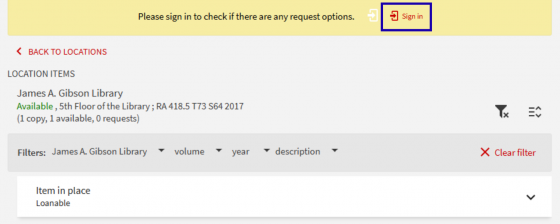
- Search Omni for your item.
- Sign-in for request options.

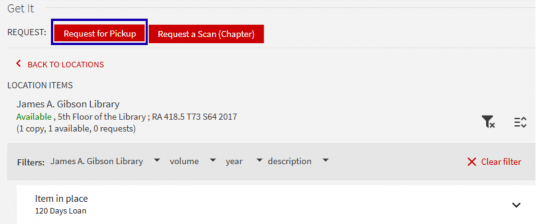
- Click on Request for Pick-up.
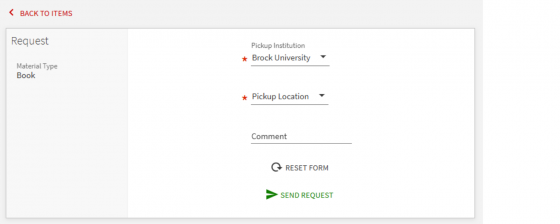
- Select the Pick-up Institution (default is Brock), and select the Pick-up Location: James A. Gibson Library, Burlington Campus Library, or Marilyn I. Walker School of Fine and Performing Arts.
- You will receive an email notification when the item is ready to pickup.
- You can also check the status of your request via your Library Account in Omni.
Limitations
This service is available for most library material but, there are some items which cannot be requested. They include:
- Course readings
- Archives & Special Collections
- CPI (Center for Pedagogical Innovation)
- Hadiyaˀdagénhahs First Nations, Métis and Inuit Student Centre (Phyllis Webstad Library)
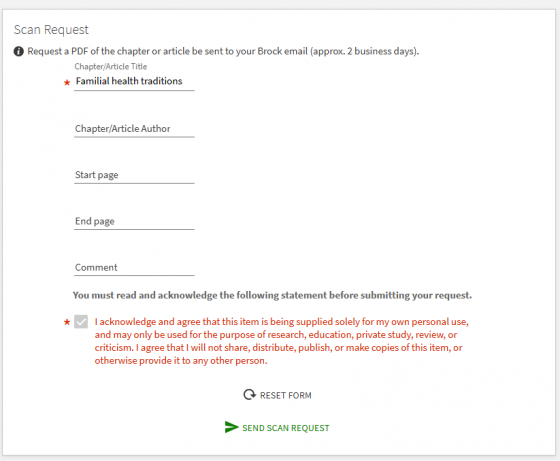
Students, faculty and staff can access book chapters and journal articles from print-only sources by requesting a scan for delivery right to your email. There is no charge for this service.
In order to comply with Brock’s Fair Dealing Policy, we can only provide scans of ‘short excerpts’: typically one chapter, one article, or 10% of a copyright-protected work.
To make your request:
- Search Omni for your item.
- Sign in for request options.
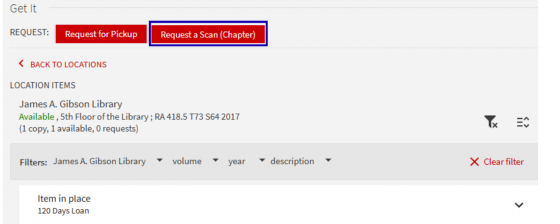
- Click on Request a Scan (chapter or article)
- Enter the details about the excerpt needed: which chapter OR which volume/ issue/ article.

- You will receive an email notification and download link when the scan is ready.
- The link allows for 5 downloads, and expires after 30 days.
LIMITATIONS
The following print materials are not available to scan:
- Course Readings on short-term loan (Reserve Collection)
- Items held in Archives and Special Collections or in the Burlington Campus Library
- Maps and atlases
- Items held in CPI (Center for Pedagogical Innovation)
- Items held in the Hadiyaˀdagénhahs First Nations, Métis and Inuit Student Centre (Phyllis Webstad Library)
- Renew by signing in to Omni with your campus id and password.
- Open the ‘My Loans’ menu item. Select specific items for renewal or renew all.
- Loans from Brock will appear by default. Select specific items for renewal or renew all.
- Contact [email protected] if you require assistance.
- Please note: some items may not be renewable if:
- they are recalled for use a course reading (“on reserve”) or,
- you have outstanding fines over $20.00
Brock University Locations:
- James A. Gibson Library Ask Us desk. An after-hours book return slot is located at the east entrance to the Library
- Burlington Campus Library
- Marilyn I. Walker School of Fine and Performing Arts: MWS Room 229

At an Omni partner library:
- Algoma University
- Carleton University
- Lakehead University
- Laurentian University
- Wilfrid Laurier University
- McMaster University
- Nipissing University / Canadore College
- OCAD University
- Ontario Tech University / Durham College
- Queen’s University
- Toronto Metropolitan University
- Trent University
- University of Guelph
- University of Ottawa
- University of Waterloo
- University of Windsor
- Western University
- York University
By mail:
Ship your returns to us at:
James A. Gibson Library
Brock University
1812 Sir Isaac Brock Way,
St. Catharines, ON
Canada
L2S 3A1
Loan periods and item limits by user type
Please consult the borrowing policies page for details.
Overdue fines
Avoid incurring fines by signing-in to Omni to view the list of items you have borrowed and their due dates.
Please consult the borrowing policies page for detailed overdue fines information and an appeal form.